 Euclid.Kontur

Euclid.Kontur


Exact and fast boolean operations on 2D polygons in F#: union, intersection, difference and xor, plus
self-intersection cleanup and union of many regions. A Kontur (German for contour) is a 2D region
defined by one or more closed Polyline2D paths and a fill rule. Euclid.Kontur works directly with
floating-point coordinates and the Polyline2D type from Euclid.
Written 99% by ChatGPT-6-Astra and Claude-Fable-5.1. But diligently prompted and tested with insights gained from porting Clipper2 to F# and building Euclid.
The library targets .NET 6.0 and .NET Framework 4.7.2. The NuGet package also includes its F# source for compilation to JavaScript and TypeScript with Fable.
API documentation · Changelog · Algorithm design
Install
|
For an F# script, use #r "nuget: Euclid.Kontur". Euclid is included as a dependency.
Quick start
open Euclid

let rectangle x y width height =
    let path =
        Polyline2D.createFromPts [
            Pt (x, y)
            Pt (x + width, y)
            Pt (x + width, y + height)
            Pt (x, y + height)
        ]
    path.CloseInPlace 0.0
    Kontur.createSingleton path // NonZero fill rule by default

let a = rectangle 0.0 0.0 10.0 10.0
let b = rectangle 5.0 0.0 10.0 10.0

let merged = Kontur.union a b
let overlap = Kontur.intersection a b
let cut = Kontur.difference a b // subject minus clip
let exclusive = Kontur.xor a b

printfn "Union: %d contour(s), area %g" merged.PathCount merged.SignedArea
// Union: 1 contour(s), area 150

let inside = merged.Contains (Pt (2.0, 2.0)) // true
let contours : ResizeArray<Polyline2D> = merged.Paths
Input paths must be closed: the last point repeats the first. Close them explicitly before
creating a Kontur; open paths are rejected. A Kontur keeps references to its input polylines,
so changing those polylines also changes the Kontur.
Results contain closed contours with counterclockwise outer boundaries and clockwise holes,
and use FillRule.Positive. SignedArea gives the net area of a result, subtracting holes.
For an unsimplified input Kontur with overlapping paths, its sum of signed areas need not equal
the area of the filled region.
Directly on Polyline2D
For single closed polylines the same operations are extension members of Polyline2D, so no
Kontur has to be created. They are available as soon as Euclid is opened:
let p = a.Paths.[0] // the closed Polyline2Ds of the rectangles above
let q = b.Paths.[0]

let merged : ResizeArray<Polyline2D> = p.Union q
let overlap = p.Intersection q
let cut = p.Difference q // p minus q
let exclusive = p.Xor q
let cleaned = p.Simplify ()
let all = p.UnionMany [ q ] // this polyline with any number of others

let mergedAtTolerance = p.UnionWith 1e-4 q // every member has a ...With variant
let alsoMerged = Polyline2D.union p q // and a static function: union, unionWith, unionMany, ...
Each polyline is one region under the NonZero fill rule, so its orientation does not matter.
The result is a ResizeArray<Polyline2D> because one operation can return several contours and
holes, oriented like the paths of a result Kontur. Use a Kontur for other fill rules, for
regions made of several paths, or to feed a result into the next operation.
Fill rules and multiple paths
Each Kontur has its own fill rule: NonZero, EvenOdd, Positive or Negative. Subject and
clip winding numbers are evaluated separately, so regions with different rules can be combined
in one operation. For example, an EvenOdd outline can be cut from a NonZero solid.
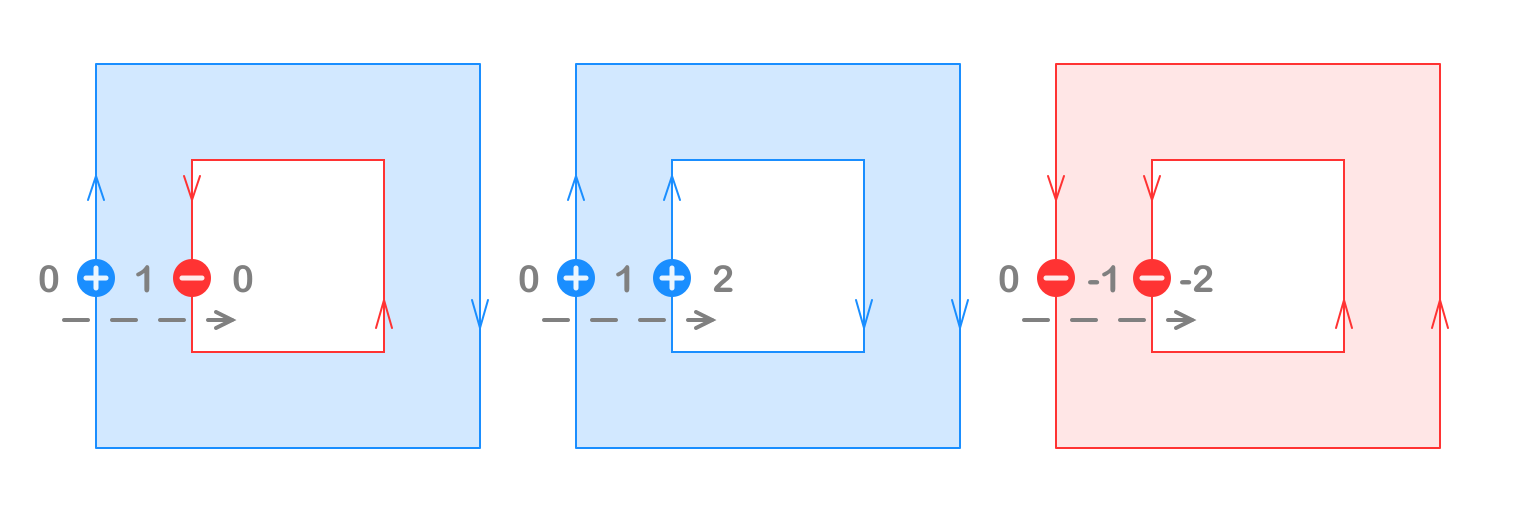
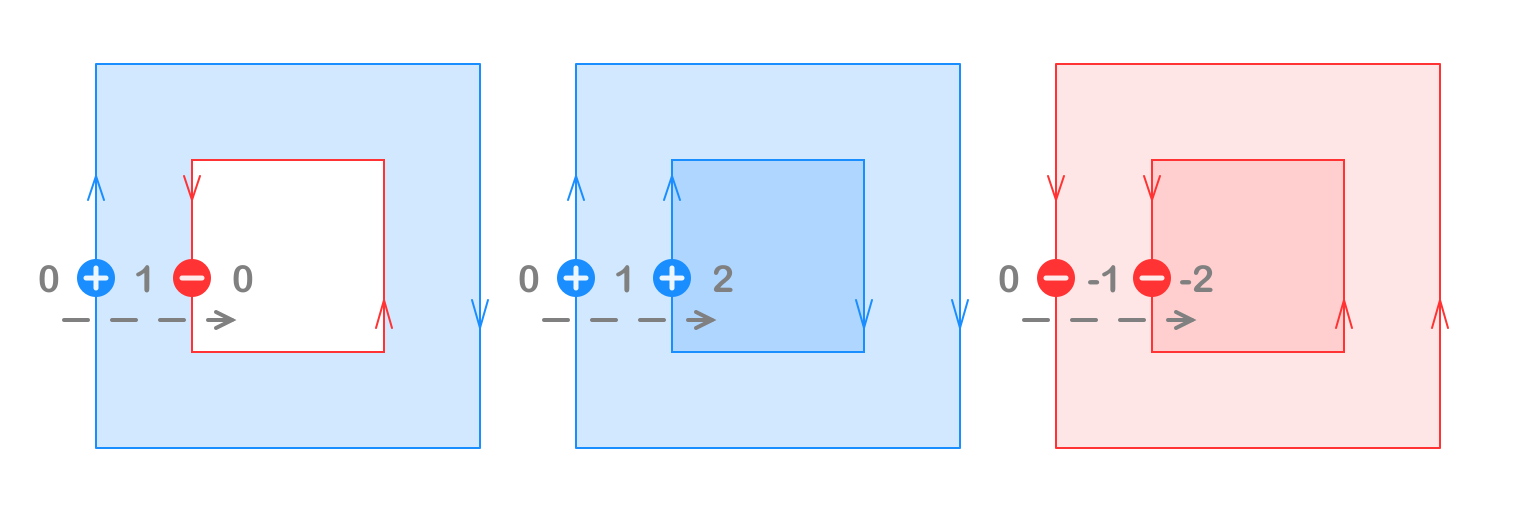
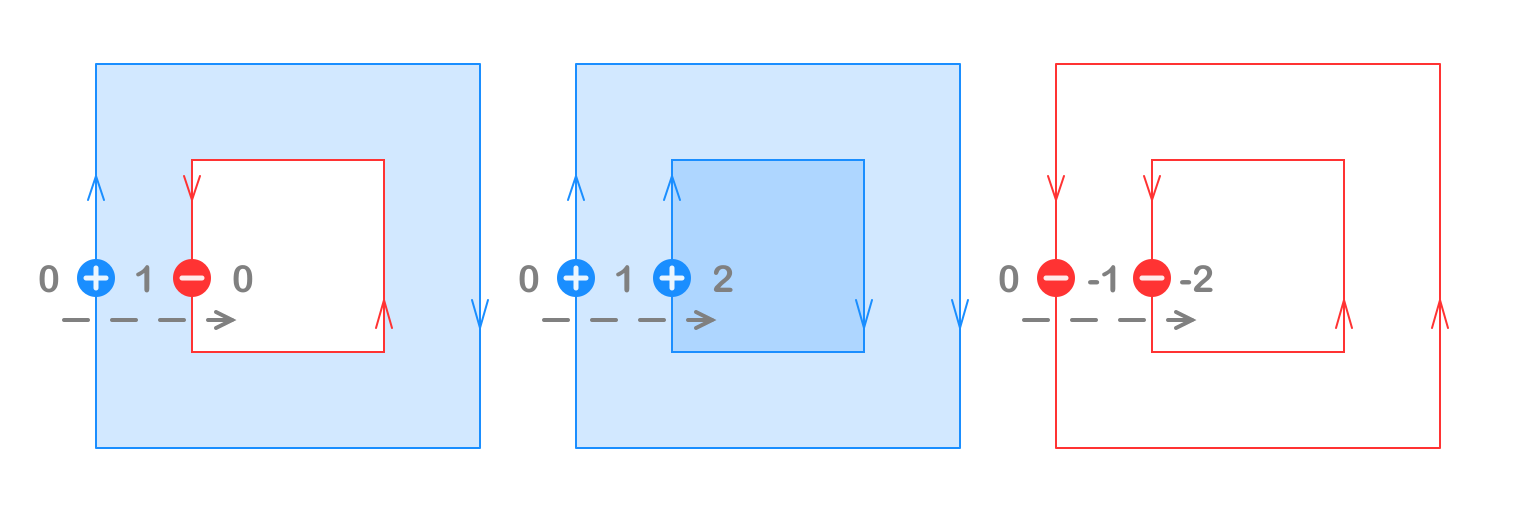
The winding number counts how often the paths wind around a point. In Cartesian coordinates
(positive Y upwards), counterclockwise turns contribute +1 and clockwise turns contribute -1.
EvenOdd ignores path direction. NonZero fills overlaps with the same direction, while opposite
directions can cancel to form holes. Reversing all paths leaves EvenOdd and NonZero unchanged
and swaps the regions filled by Positive and Negative.
EvenOdd fills regions whose winding number is odd.
NonZero fills regions whose winding number is not zero.
Positive fills regions whose winding number is greater than zero. For simple nested paths, use counterclockwise outer boundaries and clockwise holes.
Negative fills regions whose winding number is less than zero. For simple nested paths, use clockwise outer boundaries and counterclockwise holes.
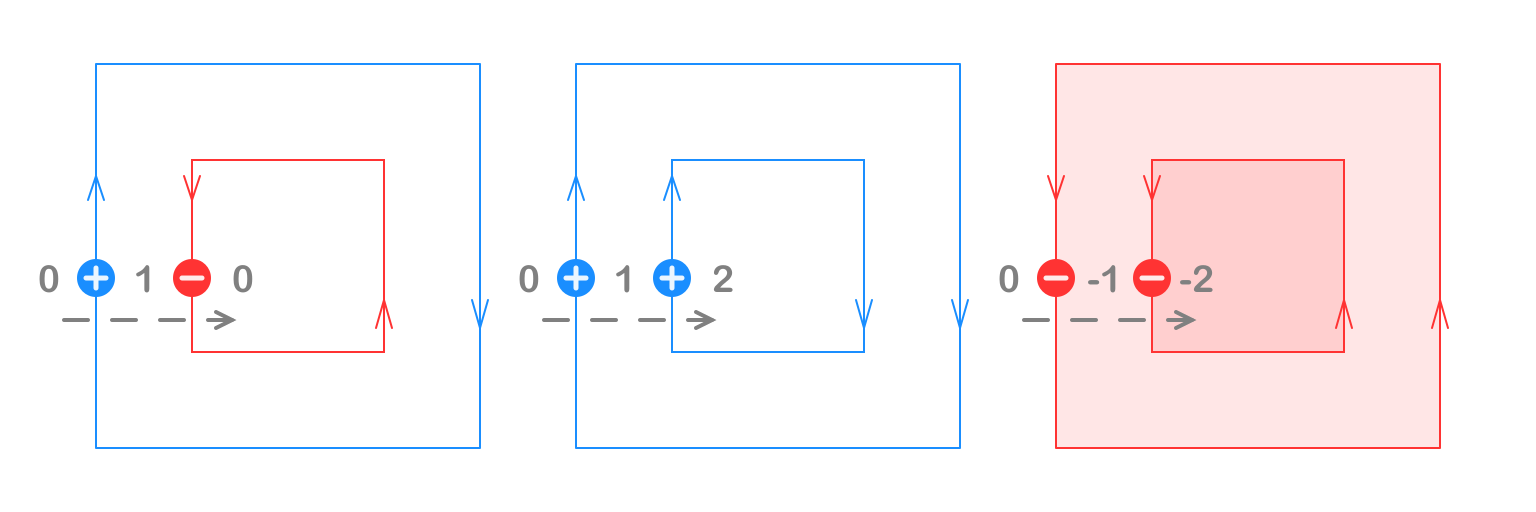
Illustrations credit: iShape / iShape-js, Filling Rules.
Using the rectangles from the quick start:
let outline = rectangle 0.0 0.0 10.0 10.0
let hole = rectangle 2.0 2.0 6.0 6.0
let frame = Kontur.create (Seq.append outline.Paths hole.Paths, FillRule.EvenOdd)

let cleaned = Kontur.simplify frame // resolves overlaps and self intersections under its rule
let filled = Kontur.unionAll [ frame; hole ] // simplifies each Kontur, then merges the results
Use simplify for paths that together define one region under one fill rule. Use unionAll
for independent regions: each is simplified under its own rule before the final merge.
Tolerance and coordinate preservation
Euclid.Kontur uses an absolute distance tolerance in the same units as the coordinates; the default
is 1e-6. Choose it to suit the smallest features you need to keep. Every operation has a
...With variant for an explicit tolerance:
let mergedAtTolerance = Kontur.unionWith 1e-4 a b
Coordinates are never quantized to an integer grid. Retained input vertices keep their original coordinates, and each new intersection is shared by the intersecting edges. Vertices within tolerance can merge onto an existing representative; nearby features can therefore disappear. Merging is transitive, so a chain of nearby vertices can collapse even when its endpoints are farther apart than the tolerance. Collinear input vertices are retained by default.
This is tolerance-based geometry, not exact arithmetic. Residual crossings and slivers at the
tolerance scale may remain, and Contains on a boundary may return either result. Version
0.1.0 supports closed polygonal paths; open-path clipping, curves, offsetting and a nesting-tree
result are outside its scope.
Reuse an engine
The convenience functions create an engine per call. For repeated operations, reuse one engine to retain its scratch buffers and reduce allocations:
let engine = KonturEngine 1e-4
let intersection = engine.Execute (a, b, ClipType.Intersection)
let simplified = engine.Simplify frame
let combined = engine.UnionAll [ a; b; frame ]
An engine is not thread safe; use a separate instance for each concurrent operation. Results own their output polylines and remain valid when the engine is reused.
Internally, Euclid.Kontur finds candidate segment pairs with sweep and prune, clusters nearby vertices, then propagates winding numbers through a planar graph and links the selected boundaries. Flat numeric arrays keep the same implementation efficient on .NET and under Fable.
Build
Developing the repository requires the .NET 10 SDK; the library itself still targets net6.0
and net472.
|
Test
Run the .NET tests from the repository root:
|
The JavaScript and TypeScript checks also require Node.js and npm:
|
The same geometry tests run on .NET and Node, including randomized point-in-region checks,
area identities, degenerate geometry, Klip regression cases and 195 Clipper2 polygon fixtures.
npm test runs the JavaScript tests in Release and Debug configurations and checks the generated
TypeScript declarations.
Benchmark
Benchmarks compare shared fixtures against Klip and Clipper2 on .NET and Klip and clipper2-ts on Node. Performance depends on the input and tolerance; see the benchmark instructions and recorded results.